GPT Image 1 Mini is a cost-efficient, natively multimodal OpenAI model that pairs GPT-5 language understanding with compact image editing and generation from text and image inputs to produce high-quality images. Ready-to-use REST inference API, best performance, no coldstarts, affordable pricing.
Idle

$0.02per run·~50 / $1
ExamplesView all
Change to a nighttime urban scene that showcases Y2K and streetwear aesthetics. Each has distinct styling: plaid shirt with ripped jeans, off-shoulder top with retro socks and chunky sneakers, crop top with cowboy boots and headphones. Elements like a bowling pin, lip gloss, and layered jewelry add personality. The setting is a gritty city spot with muted lighting, capturing a candid, trendy photoshoot vibe. Hyper-detailed, sharp focus, cinematic color grading, emphasizing fashion details and urban coolness.
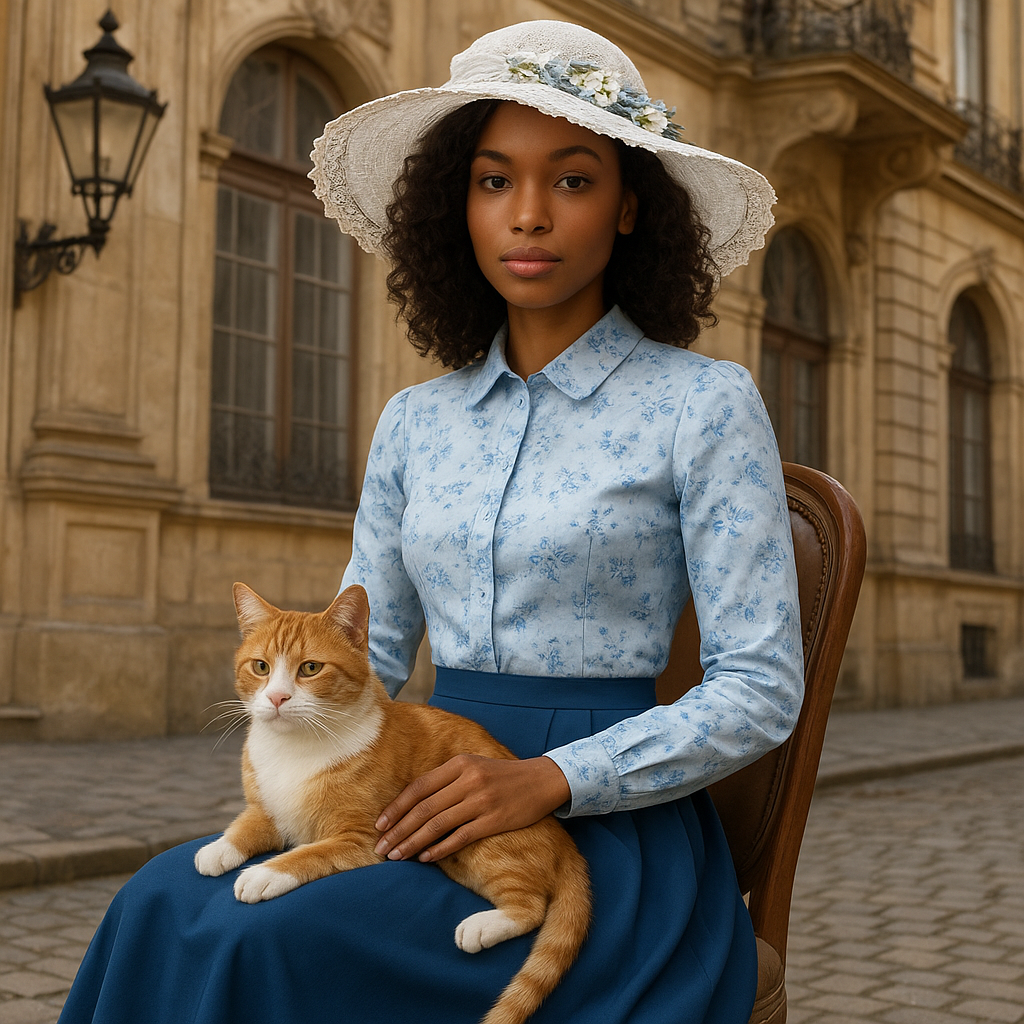
Dress the model in the clothes and hat. Add a cat to the scene and change the background to a Victorian era building.

A woman in a form-fitting beige linen midi dress with a square neckline, wearing a large, wide-brimmed straw hat, brown peep-toe heels, and layered gold jewelry (necklace, bracelets, rings), sits on a concrete ledge by a serene body of water. She poses with one hand lifting the hat brim, the other arm gracefully extended. The background features a weathered stone wall, distant buildings on a tree-lined shore, and warm golden-hour sunlight casting dramatic shadows, creating a sophisticated, timeless fashion editorial aesthetic with a focus on bold posing and retro glamour.
Related Models





README
openai/gpt-image-1-mini/edit
GPT Image 1 Mini (Edit) is a cost-efficient multimodal image editing model powered by OpenAI’s GPT-5 architecture. It enables users to refine, modify, or transform existing images using natural language instructions, while maintaining the original style, composition, and visual integrity.
🌟 Key Features
-
🧠 GPT-5-Powered Visual Understanding Understands complex textual instructions and applies targeted edits that match intent and context.
-
🎨 Intelligent Image Editing Add, remove, or modify elements in an image with precision — from subtle adjustments to full stylistic transformations.
-
🖼 Multi-Image Support Accepts one or more image inputs to guide the edit or style reference process.
-
💡 Context-Aware Refinement Preserves the key artistic or photographic features (lighting, tone, pose) while applying changes only where needed.
-
💰 Efficient and Accessible Offers professional-quality visual editing at a low cost, ideal for rapid prototyping, design iteration, or creative workflows.
⚙️ Parameters
| Parameter | Description |
|---|---|
| prompt* | Describe how you want to edit or modify the image (e.g., “change outfit colors to pastel tones, add neon city lights in the background”). |
| images* | Upload one or more reference images (JPG / PNG) to be edited or used as visual input. |
💡 Example Prompt
Three fashionable young women in a nighttime urban scene, showcasing Y2K and streetwear aesthetics. Each has distinct styling: plaid shirt with ripped jeans, off-shoulder top with retro socks and chunky sneakers, crop top with cowboy boots and accessories. Enhance lighting and color balance for a cinematic look.
💰 Pricing
| Metric | Price |
|---|---|
| Per image edit | $0.02 / image |
🎯 Use Cases
- Product & Fashion Editing — Adjust outfits, lighting, or background for catalog or campaign visuals.
- UI/UX & Brand Design — Apply aesthetic refinements to mockups or visual assets.
- Creative Direction — Evolve photo concepts while preserving original mood and framing.
- Photography & Illustration — Fix, enhance, or restyle images using natural text prompts.
Gpt Image 1 Mini Edit API — Quick start
Grab a WaveSpeedAI API key, then call POST https://api.wavespeed.ai/api/v3/openai/gpt-image-1-mini/edit with your input as JSON. The endpoint returns a prediction id. Start polling the result endpoint around every 2 seconds, increase the interval for long-running tasks, and stop on any terminal status. On completed, read output values from data.outputs. Examples for Gpt Image 1 Mini Edit below.
HTTP example
set -euo pipefail

: "${WAVESPEED_API_KEY:?Set WAVESPEED_API_KEY}"

REQUEST_BODY=$(cat <<'JSON'
{
    "prompt": "A cinematic shot of a city at sunset, soft golden light"
}
JSON
)

# 1. Submit the prediction.
SUBMIT_RESPONSE=$(curl --silent --show-error --fail-with-body \
  -X POST "https://api.wavespeed.ai/api/v3/openai/gpt-image-1-mini/edit" \
  -H "Content-Type: application/json" \
  -H "Authorization: Bearer $WAVESPEED_API_KEY" \
  -d "$REQUEST_BODY")

TASK=$(printf '%s' "$SUBMIT_RESPONSE" | jq 'if has("data") then .data else . end')
PREDICTION_ID=$(printf '%s' "$TASK" | jq -r '.id')
if [ -z "$PREDICTION_ID" ] || [ "$PREDICTION_ID" = "null" ]; then
  printf 'Submission response did not contain a prediction id
' >&2
  exit 1
fi
RESULT_URL=$(printf '%s' "$TASK" | jq -r '.urls.get // empty')
if [ -z "$RESULT_URL" ]; then
  RESULT_URL="https://api.wavespeed.ai/api/v3/predictions/$PREDICTION_ID/result"
fi

# 2. Poll until the prediction finishes.
while true; do
  RESPONSE=$(curl --silent --show-error --fail-with-body "$RESULT_URL" \
    -H "Authorization: Bearer $WAVESPEED_API_KEY")
  RESULT=$(printf '%s' "$RESPONSE" | jq 'if has("data") then .data else . end')
  STATUS=$(printf '%s' "$RESULT" | jq -r '.status')
  case "$STATUS" in
    completed) printf '%s\n' "$RESULT" | jq '.outputs'; break ;;
    failed|cancelled|timeout) printf '%s\n' "$RESULT" | jq . >&2; exit 1 ;;
    created|processing) sleep 2 ;;
    *) printf 'Unexpected status: %s
' "$STATUS" >&2; exit 1 ;;
  esac
done
Node.js example
const submitUrl = "https://api.wavespeed.ai/api/v3/openai/gpt-image-1-mini/edit";
const apiKey = process.env.WAVESPEED_API_KEY;
if (!apiKey) throw new Error('Set WAVESPEED_API_KEY');

async function requestJson(url, options = {}) {
  const response = await fetch(url, options);
  if (!response.ok) throw new Error(await response.text());
  return response.json();
}

// 1. Submit the prediction.
const body = await requestJson(submitUrl, {
  method: "POST",
  headers: {
    "Authorization": `Bearer ${apiKey}`,
    "Content-Type": "application/json",
  },
  body: JSON.stringify({
        "prompt": "A cinematic shot of a city at sunset, soft golden light"
}),
});
const task = body.data ?? body;
if (!task.id) throw new Error("Submission response did not contain a prediction id");
const resultUrl = task.urls?.get ||
  `https://api.wavespeed.ai/api/v3/predictions/${task.id}/result`;

// 2. Poll until the prediction finishes.
while (true) {
  const resultBody = await requestJson(resultUrl, {
    headers: { "Authorization": `Bearer ${apiKey}` },
  });
  const result = resultBody.data ?? resultBody;
  if (result.status === "completed") {
    console.log(result.outputs);
    break;
  }
  if (["failed", "cancelled", "timeout"].includes(result.status)) throw new Error(JSON.stringify(result));
  if (!["created", "processing"].includes(result.status)) throw new Error("Unexpected status: " + result.status);
  await new Promise(resolve => setTimeout(resolve, 2000));
}
Python example
import json
import os
import time
from urllib.request import Request, urlopen

api_key = os.environ["WAVESPEED_API_KEY"]
headers = {"Authorization": f"Bearer {api_key}", "Content-Type": "application/json"}
payload = {
    "prompt": "A cinematic shot of a city at sunset, soft golden light"
}

def request_json(url, data=None):
    request = Request(url, data=data, headers=headers, method="POST" if data else "GET")
    with urlopen(request) as response:
        return json.load(response)

# 1. Submit the prediction.
body = request_json("https://api.wavespeed.ai/api/v3/openai/gpt-image-1-mini/edit", json.dumps(payload).encode())
task = body.get("data", body)
if not task.get("id"):
    raise RuntimeError("Submission response did not contain a prediction id")
result_url = task.get("urls", {}).get("get") or f"https://api.wavespeed.ai/api/v3/predictions/{task['id']}/result"

# 2. Poll until the prediction finishes.
while True:
    result_body = request_json(result_url)
    result = result_body.get("data", result_body)
    status = result.get("status")
    if status == "completed":
        print(result.get("outputs", []))
        break
    if status in {"failed", "cancelled", "timeout"}:
        raise RuntimeError(result)
    if status not in {"created", "processing"}:
        raise RuntimeError(f"Unexpected status: {status}")
    time.sleep(2)
Gpt Image 1 Mini Edit API — Frequently asked questions
What is the Gpt Image 1 Mini Edit API?
Gpt Image 1 Mini Edit is a OpenAI model for image editing, exposed as a REST API on WaveSpeedAI. GPT Image 1 Mini is a cost-efficient, natively multimodal OpenAI model that pairs GPT-5 language understanding with compact image editing and generation from text and image inputs to produce high-quality images. Ready-to-use REST inference API, best performance, no coldstarts, affordable pricing. You can call it programmatically or try it from the playground above.
How do I call the Gpt Image 1 Mini Edit API?
POST your input parameters to the model's REST endpoint (shown in the API tab of this playground) with your WaveSpeedAI API key in the Authorization header. Submission returns a prediction ID. Poll the result endpoint starting around every 2 seconds, increase the interval for long-running tasks, and stop on any terminal status. The playground generates production-oriented Python, JavaScript, and cURL examples with timeouts, transient-error handling, and safe GET retries. Full request/response shape is documented at https://wavespeed.ai/docs/docs-api/openai/openai-gpt-image-1-mini-edit.
How much does Gpt Image 1 Mini Edit cost per run?
Gpt Image 1 Mini Edit starts at $0.020 per run. That figure is the base price — the final charge scales with the parameters you set in the form (output size, length, count, references, or whatever knobs this model exposes), so a higher-quality or larger output costs more than a minimal one. The exact cost for your current input is shown live next to the Generate button before you submit, and the actual per-call charge is recorded on the prediction afterwards.
What inputs does Gpt Image 1 Mini Edit accept?
Key inputs: `prompt`, `images`, `enable_base64_output`, `enable_sync_mode`. The full JSON schema (types, defaults, allowed values) is rendered above the Generate button and mirrored in the API reference at https://wavespeed.ai/docs/docs-api/openai/openai-gpt-image-1-mini-edit.
How do I get started with the Gpt Image 1 Mini Edit API?
Sign up for a free WaveSpeedAI account to claim starter credits, copy your API key from /accesskey, then call the endpoint shown in the API tab of the playground. The playground also auto-generates a code sample in Python, JavaScript, or cURL for the parameters you've set.
Can I use Gpt Image 1 Mini Edit outputs commercially?
Commercial usage rights depend on the model's license, set by its provider (OpenAI). The license summary appears on the model card above; see WaveSpeedAI's Terms of Service for platform-level conditions.